20/12/2013

Exposure Joystick mk 8: What is new?

Having purchased a mk7 joystick last year, which in this day and age of cheap Chinese lights is a leap of faith, I have been pleasantly surprised at its output and reliability. It is the later point that is important to me.

I noticed that there was now a Exposure Joystick mk8 released, and as my sister asked for a light, I decided to ask around the family and buy one for a joint Xmas and Birthday present.

For those like me  that were wondering what differences there were to the Joystick mk7, aside from cosmetic,  here is their response from USE, the manufactureres.

Q: Please could you explain how the Exposure Joystick mk8 is different from the mk7? Are the changes purely cosmetic?
  
A: Thanks for the enquiry. The Joystick Mk8 has been updated with newer technology to make it more efficient. This can be seen in the performance due to the thermal management being improved allowing for better heat transfer to give the light better longevity. It has also been updated cosmetically as you said in your email.

Exposure Joystick mk7

Exposure Joystick mk8

18/01/2011

Korg Poly 61 and Poly Six (6) DIY Notes

Battery Replacement:

Modifications, Korg Polysix battery leakage
Old Crow's Synth Shop: Korg Polysix Battery Repair

Source: http://www.gearslutz.com/board/electronic-music-instruments-electronic-music-production/415591-polysix-memory-issues.html

Midi Interface:

DIY Poly 61 Midi Inteface: http://www.chd-el.cz/index.php?id=464&lngid=en

Harmony H75 Information


Harmony Archtops

This is the “Cadillac” of the archtop thinlines. The pickups are Maximum DeArmond and the three toggles give you 6 positions. The tremolo is a Bigsby. It features an “Ultra Slim” neck with “Torque-Lok” adjustable reinforcing truss rod. It also sports an ovalled rosewood fingerboard with edge bindings and inlaid position markers. The body is curly maple and the tone, beautiful! This was Harmony’s answer to the Gibson ES335. Harmony really tried to break into the professional market with these. The headstock is tortoise. They were offered in two colors, warm cherry tone red, and rich brown mahogany sunburst. The models are identified in this manner: H75, mahogany sunburst, deluxe fixed tailpiece. H76, same as H75 but with Bigsby “True Vibrato” tailpiece. H77 Cherry red, deluxe fixed tailpiece. H78, same as H77 but with Bigsby “True Vibrato” tailpiece.

Most Harmony hollowbody electrics were designed to be used with heavy flat wound strings. Since most players do not use flat wound strings, it is important to find the happy medium. 9-42 gauge strings are too light, the pickups do a good job of getting signal, but the bolt on necks are a little “goosey”. The best gauge that I have found for Harmony hollowbody guitars is 10-46. This still allows us benders to wail, while getting the neck stability much better. The pickups also “hear” the heavier gauge strings better, and as a general rule, the heavier the string, the better the tone. Originally, these guitars had 11-52 gauge, all right for rhythm or finger style, but a little heavy for my taste.

Source: http://journal.joshcarr.com/blog/2004/11/16/harmony-h75-h76-h77-h78

26/11/2010

ContourHD Camera Mounting Problems

Well after playing around with my VehoMuvi (which I like a lot) I had a look at a friends ContourHD 1080p sports camera. With the advent of the NEW GPS version prices are falling as low as £170 it made me think that perhaps it was time for an upgrade.

The GPS integration of the new model is currently only available when posting videos through the Contour website, so this rules it out as an option in my book.

So with prices at an all time low, this led me to start some research into this product that seems to be selling so well.

It seems that the image quality is stunning whilst it also able to capture at an amazing rate of 60fps. However the biggest downside for usage by cyclists (road and MTB) seems to be the woeful mounting options onto the body or bike. And what a fundamental flaw this is.

Contour seems to have made an attempt at addressing these poor mounting issues at the start of 2010, but even still it seems that these are the new helmet mount is not sufficient, and are perhaps leaving the market to GoPro et al.

The underside of the waterproof housing and the expensive camera mount options both can take normal camera screw mounts in addition to the Contour proprietary side slide-rails. The only problem with this is finding a mount that is stable enough due to the weight of the Contour and mounting on the bars gives immense wobble cam

Despite early funny (& official) head mounted efforts, it does seem as if people are coming up with all sorts of wacky mounts, but none suitable for MTBing afaik!

MTBers have tried in vain to get this to work, but to no avail

Has anyone found a reliable way of mounting these cameras on the helmet?

11/01/2009

MusicPal USB Port

It seems that Freecom themselves skip over the blanked out USB port on the left (photo src).


As others have written, there is a space for a USB port on the circuit board and the newer firmwares (1.46 and above) automatically support this. I have also read that some MusicPals come with a USB already installed, but have yet find anyone that has this out of the box (German forum postings).

As you can see from the photo on Mr mcproductions.eu site, there is a space for a USB port, but AFAIK this isnt factory installed.

I expect that I need to order something like
this L51AZ USB Type A USB 2.0 socket from http://www.maplin.co.uk/Module.aspx?ModuleNo=43990 for £1.29.

I havent started to disassemble the device yet, but once I perform the soldering job (careful not to short the circuits or fry other components) , I will also apply the read only firmware change to stop an ugly eject when you pull out the USB stick.

There is an interesting forum read on the subject here although the firmware output mentions USB 1.1 and not 2.0. Forums point to this USB socket (pdf).

10/01/2009

MusicPal Radio Station URLs

Register on http://freecom.vtuner.com/ with your serial number (your purchase automatically comes with a license so you have nothing to pay).
You can use this to add channels that the default package doesn't have, such as radionowhere.

This page gives all the BBC podcasts in a fairly MusicPal friendly format, which isnt quite BBC Listen again, but its something.
http://www.bbc.co.uk/radio/podcasts/directory/genre/

Top MusicPal Hacks & Features


If you didn't know, you can modify this device to add a few handy additions. Note: I suspect that all these will void the warranty - and you make these changes at your own risk

1. Use a remote control (software hack required)
http://freecom.mcproductions.eu/Mac/

20140620: I have noticed that the linked domain is now down.
I (mostly) recovered instructions from (
http://web.archive.org/web/20080913211616/http://freecom.mcproductions.eu/Mac/ )
Download the file ( http://web.archive.org/web/20080913211616/http://freecom.mcproductions.eu/downloads/Musicpal%20Infrared%20Remote%20control.rar  untested)

These are the instructions I copied from the webpage: Perform at your OWN peril!
 
1: Go to:
http:///admin/cgi-bin/debug and start "Start Telnet server"

2: Start your "Freecom Network Storage Assistant" and "Start recovery" after that dont close your Popup screen.

3: Place "remote.hex" file into directory: C:\Program Files\Freecom Network Storage Assistant

4: Go to start and Typ: telnet

5: login with "root" and ENTER

6: ???????????

7: Typ: /home/make_rw.sh and ENTER

8: ???????????

9: Typ: cd  /etc and ENTER

10: ???????????

11: Typ: tftp -g -r remote.hex and ENTER

12: Typ: avr_prog pdef and ENTER after that Typ: avr_prog i and ENTER

13: Typ: exit and ENTER

14: Close now your Popup screen and all Windows and restart your MusicPal

15: Tweak are 100% working.


2. Add a usb socket to play mp3s off a memory stick (soldering + software hack (to make usb devices readonly) required.
I have since read that some devices already have the USB port already on the circuitboard (unconfirmed) The highest confirmed data volumes used are as follows (not to say higher volumes cannot be used);
USB 4GB stick
Powered HD 160Gb Fat32


3. Use the device with a battery pack (simple diy battery pack build required - be very careful of the polarity!)

From the forums:
"Male is outside the black cables, connectors inside the red.
There are, according to V 5.6 meter from the charger, exactly what the gauge also indicates when the battery pack attaches the plug!
Caution: If a minus it is displayed, then the polarity is wrong and that could damage the device is likely.

Total Cost: about 23 euros
Battery charger included 4x2700 mAh NiMH rechargeable batteries: 19.95
Battery Holder: 1,49 Euros
BatteryClips: 0,26 Euro
Male 2.5 mm: 0.66 euros "

4. If you turn the MusicPal into standby, the audio in 3.5 socket seems act as an audio in !? ( source )

MusicPal Web Resources

I shall keep this page updated as I find more useful information;

MusicPal - Official Freecom Product Page
http://www.musicpal.info/

Freecom Musicpal Forum - English
http://forum.freecompromo.com/viewforum.php?f=65

Freecom Musicpal Forum - German (Google English transaltion) - where the good stuff lies
http://66.102.9.102/translate_c?hl=en&sl=de&tl=en&u=http://forum.freecompromo.com/viewforum.php%3Ff%3D66

MusicPal Firmware
http://www.freecom.com/firmware.asp?form1=true&form2=true&serie=1147841&Manufactures=1147841

User Resource - Lots of useful hack how-tos
http://freecom.mcproductions.eu/

Wiki
http://elinux.org/Freecom_MusicPal

Wiki - My MusicPal
http://www.mydssd.de/musicpal/doku.php?id=my_musicpal

Intrepid blogger writing exciting custom code (still work in progress)
http://nerdytoad.blogspot.com/2008/11/more-on-writing-to-musicpal-display.html

FNSA problems and MusicPal firmware

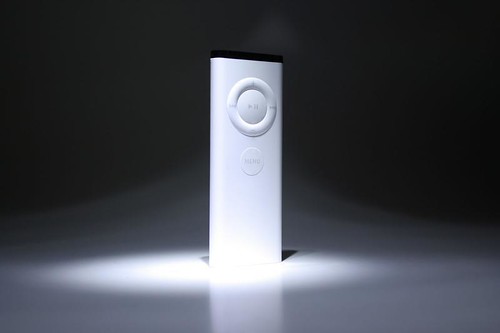
OK, all is going well. I acquired a Mac Remote from ebay for £6+£2p&p.

At the time of writing, the seller seems to have more of the same available: http://shop.ebay.co.uk/merchant/emelee.1973_2008


I had already upgraded my MusicPal firmwre to v1.51 via the autoupdate feature on MusicPal itself.


I enabled telnet and downloaded FSNA to a directory(it doesnt come with an installer).

I then proceeded to follow the instructions hereL http://freecom.mcproductions.eu/Mac/

I tried to start the remote hack processs by selecting the "start recovery procedure" but I got the following error;

"File "dt2image.bin" is missing"


The work around for this, was to downloaded the same version of the MusicPal firmware as I had automatically updated to (v1.51) and placed this file in the same directory as FNSA.exe. Whilst I was at it, I also put the remote.hex file from http://freecom.mcproductions.eu/downloads/Musicpal%20Infrared%20Remote%20control.rar
the in this same directory.

After when I clicked the "start recovery procedure" link I got the following error;

Freecom Network Storage Assistant
Your computer has no IP address:
Please setup a ip address like xxx.xxx.x.2 manually
For assisttance consult the user manual.


The solution was not to use a Vista PC, but use a XP instead. The rest of the procedure worked as expected.

The remote control upgrade is one of the easiest and most recommended, as it improves usability untold amounts.

07/01/2009

Enabling Telnet via the Debug Page

Ok. So you have connected your MusicPal to the network but want to delve a bit deeper? You will need to enable the telnet session.

You can enable telnet either by browsing to the following page and ticking the checkbox Start Telnet Server.

http://xxx.xxx.x.xx/admin/cgi-bin/debug.cgi
where xxx.xxx.x.xx is the IP address of your music pal device. If you are not sure of the IP address, you can read it from the MusicPal Menu option Settings->Information and the current IP will be listed on this page.

The default username/password is admin/admin, but you should have changed this already? If not, change the password as soon as you can.

Or you can call this link directly:

http://xxx.xxx.x.xx/admin/cgi-bin/debug.cgi?f=start_telnet_server&v=true